
We are excited to share the results of our MCPMark evaluation of InsForge MCP.
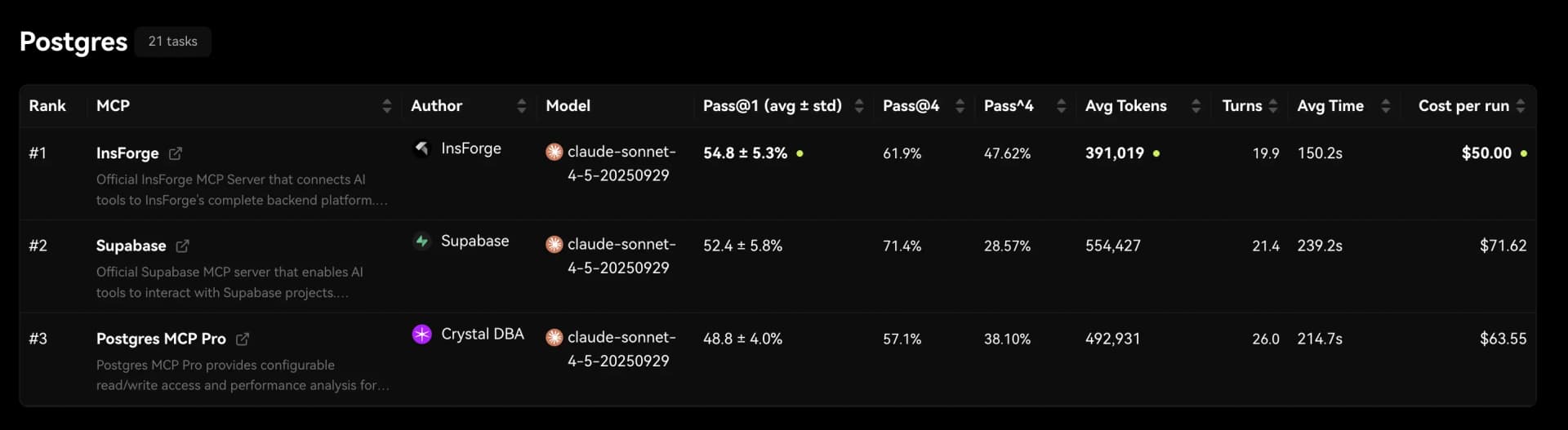
Across 21 real world database tasks, InsForge MCP is 1.6x faster, uses 30 percent fewer tokens, and achieves up to 70 percent higher Pass⁴ accuracy than Supabase MCP and Postgres MCP. These results show that providing richer and more precise backend context allows AI agents to complete complex database operations more efficiently and more reliably.
We ran this evaluation using MCPMark, an open source benchmark designed to measure how well MCP servers support large language models in performing non trivial database tasks. MCPMark focuses on correctness, repeatability, and cost by tracking accuracy, token usage, tool calls, and run time across repeated executions.
InsForge MCP consistently produces higher accuracy while consuming fewer tokens across a wide range of workloads. This is because our MCP layer gives AI agents a complete and structured view of the backend, allowing them to reason about schemas, constraints, security policies, and data relationships without guessing. When agents understand the backend state clearly, they generate more precise SQL, avoid unnecessary retries, and behave more predictably.
The Problem
Large language models have limited context windows. When the model cannot see the full backend, it hallucinates and tries to guess the current backend structure, which leads to recurring failures.
Examples including:
- Joining tables that do not share a valid foreign key relationship
- Ignoring row level security rules and exposing restricted data
- Querying columns or tables that no longer exist in the current schema
See here for a detailed explanation of why context matters: Why Context is Everything in AI Coding
The Benchmark
To quantify context efficiency and accuracy, we used the MCPMark Postgres Dataset. This benchmark evaluates whether an MCP server enables an agent to perform the required database operations correctly. The suite includes 21 real world tasks that cover analytical reporting, complex joins, migrations, CRUD logic, constraint reasoning, index creation, query optimization, row level security enforcement, trigger based consistency, transactional operations, audit logging, and vector search through pgvector. MCPMark also records accuracy, token usage, tool call counts, and run time, providing a clear and reproducible basis for comparing different MCP layers.
For this evaluation, we compared three MCP servers: Supabase MCP, Postgres MCP, and InsForge MCP. All three servers allow an LLM, acting as an MCP client, to inspect database schemas and perform database operations. Tests were run using the Anthropic Sonnet 4.5 model. Each task was executed 4 times to reduce model variability and ensure stable results.
The Results
We evaluated InsForge against Postgres MCP and Supabase MCP using MCPMark. The benchmark measures three dimensions that matter most for AI coding agents operating backend systems: run time, token usage, and Pass⁴ accuracy.
Pass⁴ accuracy is a strict metric. A task is counted as successful only if the agent completes it correctly in all four independent runs. This reflects not just whether an agent can succeed once, but whether it can reliably repeat the same backend operation without mistakes.
Across all metrics, InsForge consistently outperforms both Postgres MCP and Supabase MCP.
Run Time
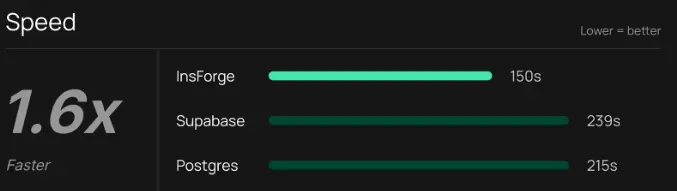
InsForge is 1.6x faster than both Postgres MCP and Supabase MCP on backend tasks.
Across the 21 evaluated tasks, InsForge completes each task in an average of 150 seconds. In contrast, both Postgres MCP and Supabase MCP require more than 200 seconds on average to complete the same tasks.
This difference compounds in real agent workflows. Faster execution means agents can iterate more quickly, recover from errors sooner, and complete multi step backend operations with less latency.
Token Usage
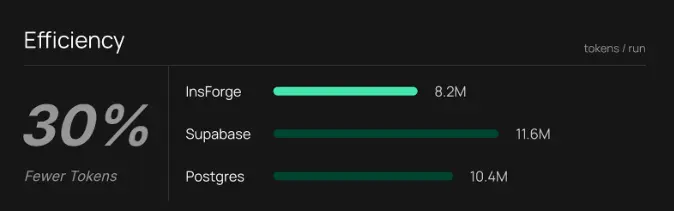
InsForge uses approximately 30 percent fewer tokens per run than Postgres MCP and Supabase MCP.
Across all 21 tasks, InsForge consumes an average of 8.2 million tokens per run. Postgres MCP uses 10.4 million tokens on average, while Supabase MCP uses 11.6 million tokens.
Lower token usage indicates that agents require fewer corrective steps and less redundant reasoning to complete backend operations. In practice, this directly translates to lower cost and more predictable agent behavior.
Pass⁴ Accuracy
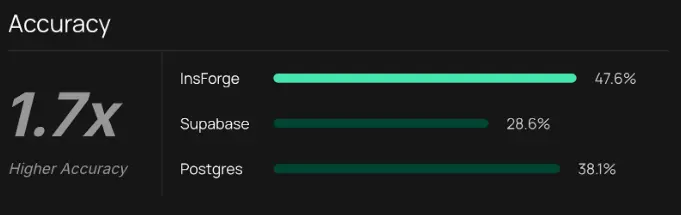
InsForge achieves up to 70 percent higher Pass⁴ accuracy under strict repeated execution.
Under the Pass⁴ metric, InsForge reaches an accuracy of 47.6 percent. Supabase MCP achieves 28.6 percent, and Postgres MCP reaches 38.1 percent.
This result highlights an important difference. While agents may occasionally succeed on other MCP servers, they fail more often when asked to repeat the same backend task multiple times. InsForge enables agents to complete complex backend operations correctly and consistently across repeated runs.
Benchmark Summary
Across speed, cost, and reliability, InsForge provides a backend environment where AI coding agents perform better.
Agents complete backend tasks faster, use fewer tokens, and make fewer mistakes when operating on InsForge. These improvements become especially significant in multi step workflows where stability and repeatability matter.
A full per task breakdown for all 21 benchmark cases is available in Appendix 1.
Deep Dive Example 1: RLS Setup
Task: security__rls_business_access
Implement Row Level Security policies for a social media platform with 5 tables (users, channels, posts, comments, channel_moderators).
Results Summary 1
| Backend | Success Rate | Tokens Used | Turns |
|---|---|---|---|
| InsForge | 4/4 (100%) | 296K | 15 |
| Supabase | 1/4 (25%) | 340K | - |
| Postgres | 4/4 (100%) | 581K | 23 |
InsForge's get-table-schema provides RLS-aware context:
{
  "users": {
    "schema": [...],
    "indexes": [...],
    "foreignKeys": [...],
    "rlsEnabled": false,
    "policies": [],
    "triggers": []
  }
}
The agent immediately knows: RLS is disabled, no policies exist. It can proceed directly to implementation.
Postgres's get_object_details lacks RLS information:
{
  "basic": { "schema": "public", "name": "users", "type": "table" },
  "columns": [...],
  "constraints": [...],
  "indexes": [...]
}
No rlsEnabled field. No policies field. The agent must run additional queries to check RLS status before proceeding.
Execution Pattern Comparison
InsForge (15 turns, 296K tokens):
get-instructions          → Learns how to use InsForge Workflow
get-backend-metadata      → All 5 tables at a glance
get-table-schema × 5      → Full schema WITH RLS status (parallel)
run-raw-sql × 6           → Create functions, enable RLS, create policies
Postgres (23 turns, 581K tokens):
list_schemas              → Schema names only
list_objects              → Table names only
get_object_details × 5    → Schema WITHOUT RLS status
execute_sql               → Query to check current RLS status
execute_sql × 8           → Create functions, enable RLS, policies
execute_sql × 4           → Verification queries
Supabase MCP provides only list_tables for discovery. It returns table names without structure, constraints, or RLS status. The agent attempted blind migrations without understanding existing state:
list_tables               → Just table names
apply_migration           → Failed: naming conflict
apply_migration           → Retry, still incomplete
Without visibility into existing policies or RLS status, the agent couldn't reliably implement the required security model.
Deep Dive Example 2: Demographics Report
Task: employees__employee_demographics_report
Create four statistical tables for an annual HR demographics report: gender statistics, age group analysis, birth month distribution, and hiring year summary. Requires understanding employee-to-salary table relationships.
Results Summary 2
| Backend | Success Rate | Tokens Used |
|---|---|---|
| InsForge | 4/4 (100%) | 207K |
| Supabase | 3/4 (75%) | 204K |
| Postgres | 2/4 (50%) | 220K |
InsForge is the only backend with 100% reliability. Token usage is similar across all three, but Supabase and Postgres fail due to SQL logic errors.
InsForge's get-backend-metadata exposes record counts for each table:
{
  "tables": [
    { "schema": "employees", "tableName": "employee", "recordCount": 300024 },
    { "schema": "employees", "tableName": "salary", "recordCount": 2844047 }
  ]
}
This gives the agent a clear relationship signal:
- 2.84M salary rows
- 300K employees
- roughly 9.5 salary records per employee
The agent immediately understands it must avoid naive COUNT(*) over a JOIN and instead use COUNT(DISTINCT e.id). This prevents the most common metrics error in many to one relationships.
Both Supabase and Postgres lack record count visibility:
- Supabase: list_tables shows names only
- Postgres: list_objects + get_object_details show schema but no counts
Example failure written using Supabase and Postgres MCP:
SELECT gender, COUNT(*)   -- ❌ counts salary rows, not employees
FROM employee e
LEFT JOIN salary s ON e.id = s.employee_id;
This produces results 9.5 times too large, matching the row multiplication effect.
Correct SQL written when using InsForge MCP:
SELECT gender, COUNT(DISTINCT e.id)
FROM employees.employee e
LEFT JOIN employees.salary s ON e.id = s.employee_id
GROUP BY gender;
InsForge's metadata gives agents the context they need to handle schema relationships correctly. Even small signals like record count can improve correctness in analytical workloads.
Conclusion
MCPMark makes it clear that reliable backend context matters. InsForge MCP helps agents complete database tasks more accurately and with fewer tokens by giving them a structured and complete view of the underlying schema.
This leads to fewer mistakes, fewer retries, and a more predictable natural-language development experience. If you want agents that can handle complex backend operations, InsForge MCP delivers the context needed to make that possible.
Appendix 1: Per Task Breakdown
Appendix 1 lists the results for every individual task in the MCPMark Postgres benchmark. For each task, we report two values for every MCP server:
- Pass⁴ accuracy: how many of the four runs succeeded
- Token usage: the average number of tokens consumed for that task
This table provides a detailed, per-task view of how InsForge MCP, Supabase MCP, and Postgres MCP performed across all twenty one benchmark tasks.
For descriptions of what each task represents, feel free to explore the official task list at: https://mcpmark.ai/tasks?category=postgres
MCP Benchmark Results
| # | Task | InsForge | Supabase | Postgres |
|---|---|---|---|---|
| 1 | chinook__customer_data_migration | 4/4, 529K | 3/4, 1,421K | 2/4, 1,639K |
| 2 | chinook__employee_hierarchy_management | 4/4, 248K | 4/4, 260K | 4/4, 230K |
| 3 | chinook__sales_and_music_charts | 0/4, 264K | 0/4, 260K | 0/4, 302K |
| 4 | dvdrental__customer_analysis_fix | 0/4, 221K | 2/4, 355K | 0/4, 333K |
| 5 | dvdrental__customer_analytics_optimization | 4/4, 277K | 3/4, 215K | 4/4, 195K |
| 6 | dvdrental__film_inventory_management | 4/4, 378K | 4/4, 342K | 4/4, 375K |
| 7 | employees__employee_demographics_report | 4/4, 207K | 3/4, 204K | 2/4, 220K |
| 8 | employees__employee_performance_analysis | 0/4, 316K | 0/4, 505K | 0/4, 211K |
| 9 | employees__employee_project_tracking | 2/4, 596K | 3/4, 321K | 2/4, 286K |
| 10 | employees__employee_retention_analysis | 0/4, 330K | 0/4, 214K | 0/4, 255K |
| 11 | employees__executive_dashboard_automation | 0/4, 438K | 1/4, 324K | 0/4, 686K |
| 12 | employees__management_structure_analysis | 4/4, 286K | 2/4, 195K | 4/4, 280K |
| 13 | lego__consistency_enforcement | 4/4, 573K | 4/4, 346K | 4/4, 787K |
| 14 | lego__database_security_policies | 0/4, 327K | 0/4, 374K | 3/4, 552K |
| 15 | lego__transactional_inventory_transfer | 1/4, 922K | 2/4, 945K | 0/4, 1,178K |
| 16 | security__rls_business_access | 4/4, 296K | 1/4, 340K | 4/4, 581K |
| 17 | security__user_permission_audit | 0/4, 118K | 0/4, 182K | 0/4, 352K |
| 18 | sports__baseball_player_analysis | 3/4, 681K | 4/4, 1,221K | 0/4, 645K |
| 19 | sports__participant_report_optimization | 4/4, 248K | 4/4, 653K | 4/4, 219K |
| 20 | sports__team_roster_management | 0/4, 318K | 0/4, 1,785K | 0/4, 369K |
| 21 | vectors__dba_vector_analysis | 4/4, 638K | 4/4, 1,181K | 4/4, 656K |