
InsForge Storage now speaks the AWS S3 protocol natively.
Point any SigV4-signing client — the aws CLI, AWS SDKs, , Terraform — at /storage/v1/s3 on your project, hand it a project access key, and you're reading and writing the same buckets you already use through the REST API and the Dashboard.
What It Unlocks
- CI and build artifacts. Push releases from GitHub Actions with
aws s3 cporrclone sync— no InsForge SDK wrapper needed. - Existing tooling, unchanged. Terraform's
aws_s3_object, backup scripts, log shippers, and DR pipelines keep working against a different endpoint. - Server-side uploads. Workers, cron jobs, and batch scripts get storage access through credentials their runtimes already handle natively.
For browser uploads, signed download URLs, and bucket visibility, stay on the TypeScript SDK. S3 keys are long-lived and project-wide; the SDK is what you want in app code.
Endpoint and Region
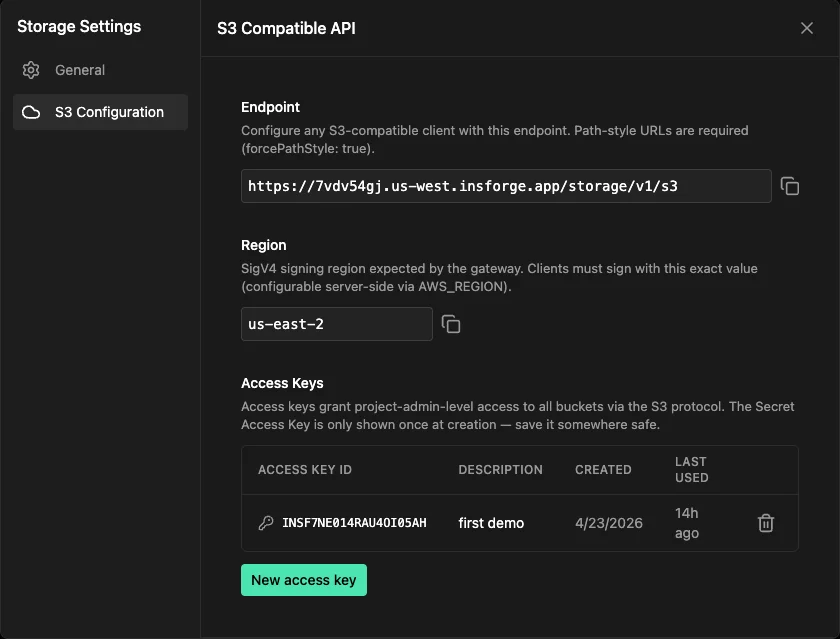
Both values live under Storage → Settings → S3 Configuration in the dashboard, or come back from GET /api/storage/s3/config.
| Field | Value |
|---|---|
| Endpoint | https://{project-ref}.{region}.insforge.app/storage/v1/s3 |
| Region | us-east-2 |
Clients must use path-style URLs (forcePathStyle: true). Virtual-hosted style is not supported.
Access Keys
Generate credentials from New access key in the same dashboard panel, or via the admin API:
curl -X POST "$API_BASE/api/storage/s3/access-keys" \
  -H "x-api-key: $ACCESS_API_KEY" \
  -H "Content-Type: application/json" \
  -d '{"description":"backup-script"}'
The secret is returned exactly once. It's encrypted at rest and we can't recover it later — capture it immediately, and revoke + recreate if you lose it.
A Quick Example
AWS CLI — drop this into ~/.aws/config:
[profile insforge]
region = us-east-2
endpoint_url = https://{project_ref}.{region}.insforge.app/storage/v1/s3
s3 =
  addressing_style = path
Then:
aws --profile insforge s3 cp ./dist s3://my-bucket/dist --recursive
aws --profile insforge s3 sync ./backups s3://my-bucket/backups
The same endpoint and addressing-style flags work for , , and rclone. The S3 gateway docs have drop-in configs for each.
Supported Operations
The gateway implements what real SDKs and tools actually call:
- Bucket:
ListBuckets,CreateBucket,DeleteBucket,HeadBucket,ListObjectsV2 - Object:
PutObject,GetObject(withRange),HeadObject,DeleteObject,DeleteObjects,CopyObject - Multipart: full lifecycle —
CreateMultipartUpload,UploadPart,CompleteMultipartUpload,AbortMultipartUpload,ListParts
Streaming uploads work by default. aws s3 cp with multi-GB files and aws s3 sync run without any client-side config changes.
Get Started
The gateway is available on InsForge Cloud projects running v2.0.9 or newer. If your project is on an older version, upgrade it to the latest release first.
- Open Storage → Settings → S3 Configuration in the dashboard
- Copy the Endpoint and Region
- Click New access key and save the secret
- Point any S3 client at that endpoint with the key