
Overview
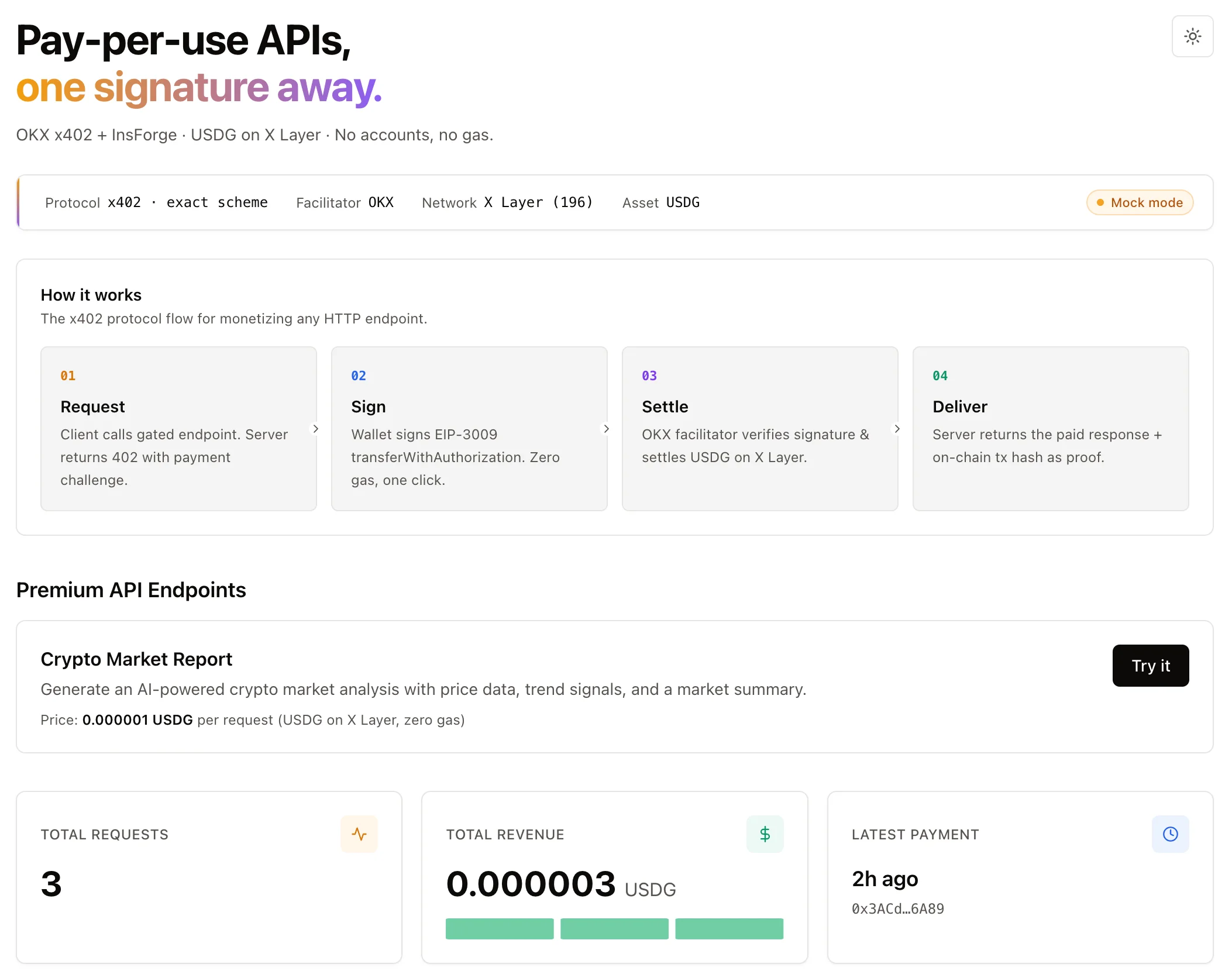
OKX OnchainOS supports the x402 protocol — an open standard that embeds payments into HTTP requests using the 402 Payment Required status code. This guide shows how to add x402 payment-gating to any endpoint in your app: the API returns a 402 challenge, the caller signs an EIP-3009 authorization with a wallet, and OKX settles USDG on X Layer (zero gas). Every successful payment is written to InsForge and streamed to a realtime dashboard.
This is ideal for AI agents and apps that need autonomous pay-per-call APIs — no API keys, no subscriptions, no signup friction.
- Live Demo — A full pay-per-use API with realtime dashboard
- Source Code — GitHub repository for the sample app
Prerequisites
- An InsForge project (self-hosted or cloud)
- An OKX account (used to sign into the Web3 Dev Portal)
- An EVM-compatible wallet (e.g. OKX Wallet or MetaMask) with an address on X Layer
- A Next.js application (or any framework — adjust the client code accordingly)
How x402 Works
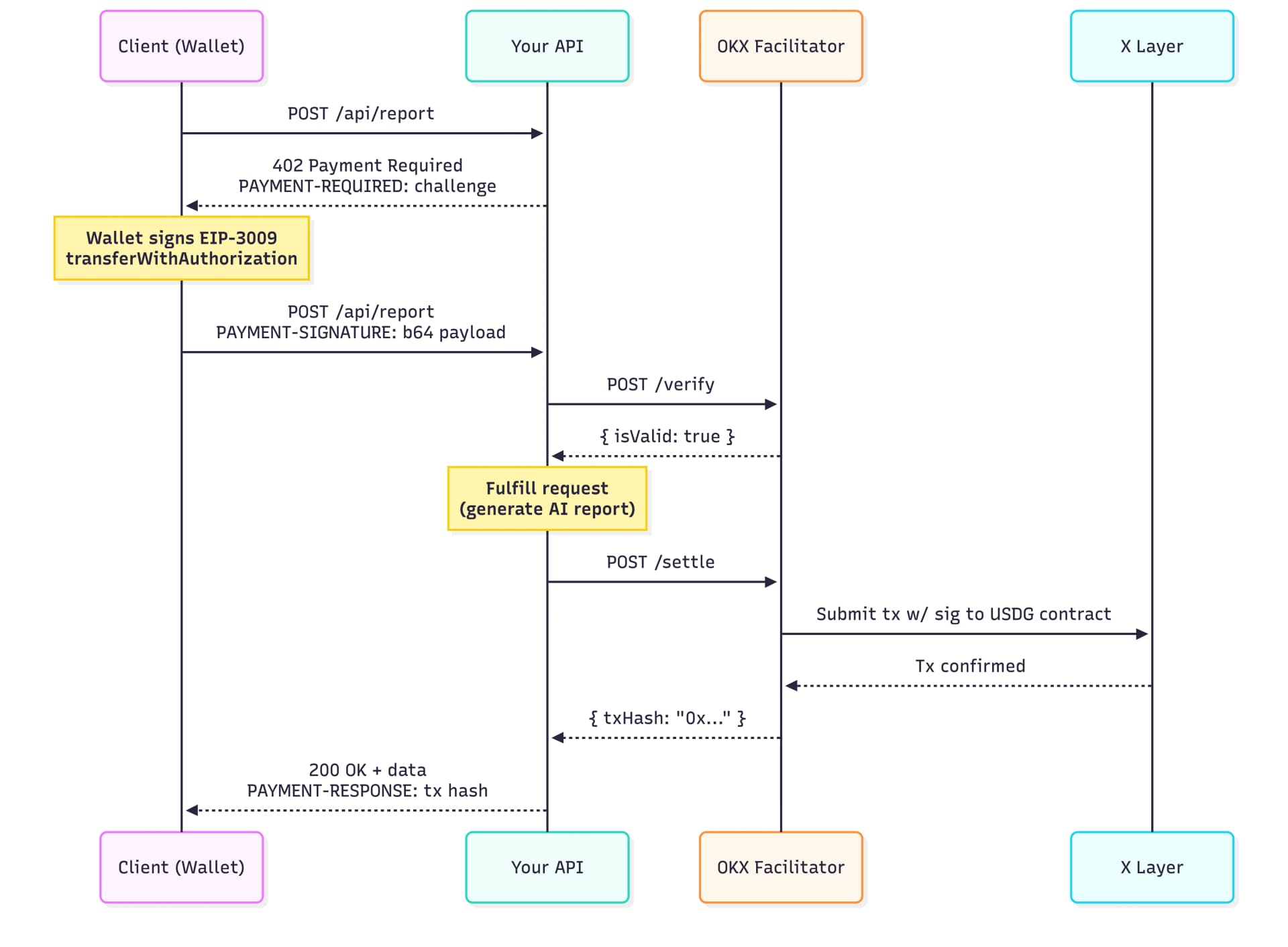
All headers (PAYMENT-REQUIRED, PAYMENT-SIGNATURE, PAYMENT-RESPONSE) carry base64-encoded JSON.
Step 1: Create an OKX Web3 API Key
The OKX x402 facilitator uses the Web3 / Onchain OS API, which is separate from the OKX exchange trading API. Do NOT reuse an exchange API key — it returns Invalid Authority (code 50114).
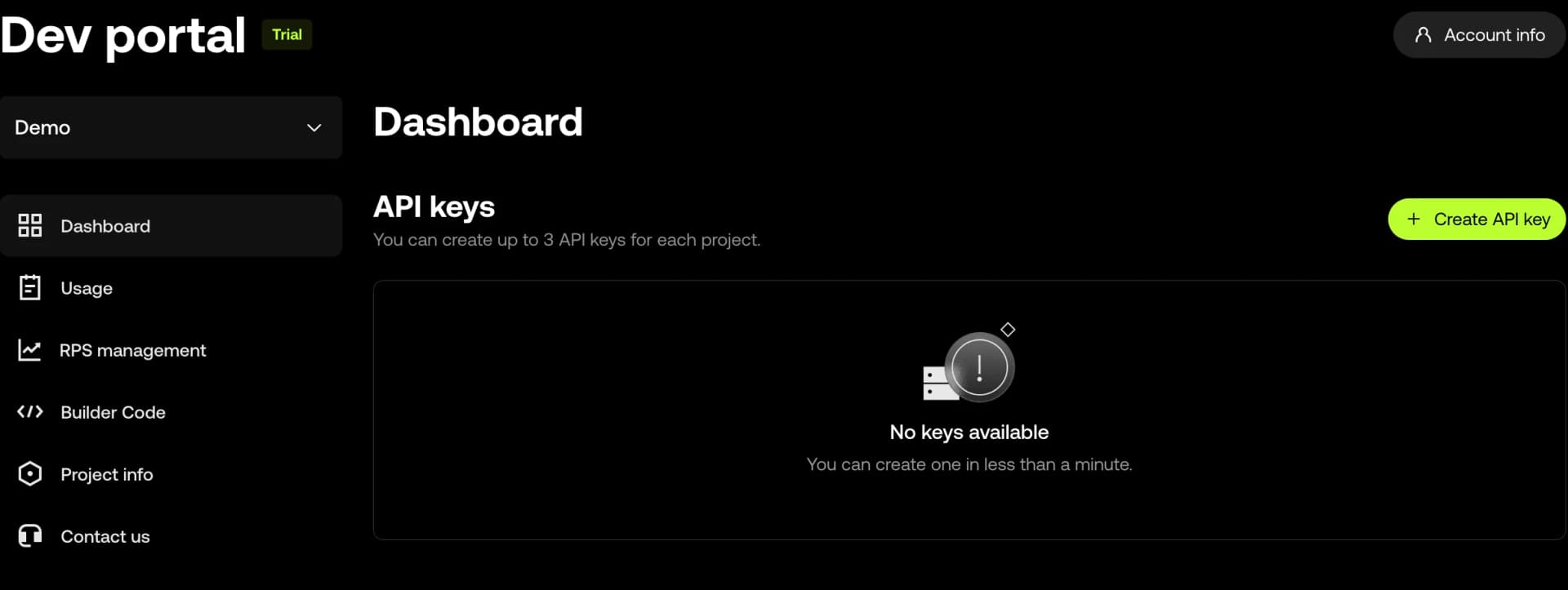
- Go to the OKX Onchain OS Dev Portal and connect your wallet
- Create a project and link your email + phone number (required to enable API key creation)
- Click Create API Key and set a passphrase of your choice
- Save the API Key, Secret Key, and passphrase — the secret is shown only once
Step 2: Set Up Your InsForge Project
# Create a new project
npx @insforge/cli create

# Or link an existing project
npx @insforge/cli link --project-id <your-project-id>
Note down the URL, Anon Key, and Service Role Key from the InsForge dashboard. These are used at runtime by the server for database writes and the browser for realtime subscription.
Step 3: Set Up Your Application
Install the required dependencies:
npm install @insforge/sdk viem
Add environment variables to .env:
# OKX Web3 API credentials (from Step 1)
OKX_API_KEY=your-web3-api-key
OKX_SECRET_KEY=your-secret-key
OKX_PASSPHRASE=your-passphrase

# Your wallet address to receive payments (0x... on X Layer)
PAYMENT_RECIPIENT=0xYourWalletAddress

# InsForge (from Step 2)
NEXT_PUBLIC_INSFORGE_URL=your-insforge-url
NEXT_PUBLIC_INSFORGE_ANON_KEY=your-anon-key
INSFORGE_SERVICE_KEY=your-service-role-key

# Demo mode — server skips on-chain settlement while testing
# The client still signs a real EIP-3009 authorization, so the UX is identical to production
MOCK_OKX_FACILITATOR=true
NEXT_PUBLIC_MOCK_OKX_FACILITATOR=true
MOCK_OKX_FACILITATOR=trueskips the OKX facilitator calls on the server so you can exercise the full flow without holding USDG. The browser flow (wallet connect + signature prompt) remains unchanged — only the server-side on-chain calls are mocked. Remove both variables (or set tofalse) when ready to settle real payments onchain.
Step 4: Set Up OKX x402 Integration
Run the following six prompts against your agent in order. Each produces a concrete slice of the demo; wait for the agent's checkpoint to pass before moving to the next.
1. Schema + realtime
Use the insforge-integrations skill to set up the x402_payments ledger: table, indexes, RLS public_read policy, realtime channel, and INSERT trigger. Apply via a single migrations/db_init.sql file.
This creates the payment ledger table and the realtime trigger, so every successful settlement streams to the dashboard in real time.
2. Server primitives + env
Use the insforge-integrations skill to add the OKX x402 server libraries and environment template: facilitator client (with MOCK branch), x402 challenge/response helpers, and the InsForge client factory.
This adds the reusable modules: the facilitator client talks to OKX, the server helpers handle challenge/response encoding, and the InsForge client factory exposes both service-key (server) and anon-key (browser) clients.
3. Payment-gated endpoint + aggregate API
Use the insforge-integrations skill to add POST /api/report — an AI-generated crypto market report gated by x402 — and GET /api/payments for the dashboard's initial load (recent rows + aggregate stats).
/api/report is the paid endpoint — it charges 0.000001 USDG per call and returns real AI-generated content plus the on-chain tx hash. /api/payments feeds the dashboard's first paint without waiting for the WebSocket.
4. Client libs + consumer flow
Use the insforge-integrations skill to add the x402 client libraries (wallet connect with X Layer chain switching, challenge decoder, EIP-3009 signer) plus a reusable consumption state machine any "Try it" button can wire up.
The client libs are framework-agnostic. The state machine handles the full x402 consume loop: fetch → detect 402 → decode header → sign → retry with PAYMENT-SIGNATURE. Chain switching is critical — a wallet on Ethereum mainnet will produce Invalid Authority errors even with a correct signature.
5. Realtime dashboard
Use the insforge-integrations skill to build the realtime payments dashboard: stats cards, live payment log, try-it playground, and a report view with on-chain tx links.
The dashboard composes three feeds: initial snapshot from /api/payments, realtime stream from the x402_payments channel, and the consumer state machine (for the "Try it" button). Every paid payment appears in the log within ~200ms of settlement without polling.
6. Diagnostics + go-live
Use the insforge-integrations skill to add the EIP-712 domain and USDG contract diagnostic scripts, then walk through the go-live checklist before accepting real payments.
Before the first real payment, these scripts confirm that the EIP-712 domain values you've hardcoded (name: "Global Dollar", version: "1") actually match the on-chain DOMAIN_SEPARATOR for the USDG contract. Skipping this step is the #1 source of Invalid Authority (code 50114) errors in production.
Step 5: Run Your Application
# Install dependencies if you haven't already
npm install

npm run dev
Open http://localhost:3000, click Try it on the endpoint, then Confirm Payment, and sign with your wallet. The response contains the paid content + a tx hash; the dashboard flashes the new row into view.
Note: To settle real payments on mainnet, fund the paying wallet with USDG on X Layer and set
MOCK_OKX_FACILITATOR=false. The OKX facilitator covers gas — the wallet only needs USDG.
Key Details
| Detail | Value |
|---|---|
| Network | X Layer (chain ID 196, CAIP-2 eip155:196) |
| Token | USDG at 0x4ae46a509f6b1d9056937ba4500cb143933d2dc8 (6 decimals) |
| EIP-712 domain | name: "Global Dollar", version: "1" |
| Gas cost | Zero for the payer (facilitator covers gas) |
| Protocol version | x402 v1 |
| Settlement | Sync (syncSettle: true) — waits for confirmation |
| Facilitator URL | https://web3.okx.com/api/v6/x402 |
Demo