
Overview
Clerk is an authentication and user management platform that provides pre-built UI components and APIs for sign-up, sign-in, and user profiles. This guide shows how to integrate Clerk with InsForge using Clerk's JWT Templates feature. Clerk signs tokens with InsForge's JWT secret, so InsForge accepts them natively.
- Live Demo — A sample todo app using Clerk authentication with InsForge
- Source Code — GitHub repository for the sample app
Prerequisites
- An InsForge project (self-hosted or cloud)
- A Clerk account and application
Step 1: Set Up Your InsForge Project
Create a new project or link an existing one:
# Create a new project
npx @insforge/cli create

# Or link an existing project
npx @insforge/cli link --project-id <your-project-id>
Then get your project credentials:
# Get the JWT Secret
npx @insforge/cli secrets get JWT_SECRET
To find your Project URL and Anon Key, open your project in the InsForge Dashboard, click the Connect button in the top-right corner, and switch to the API Keys tab:
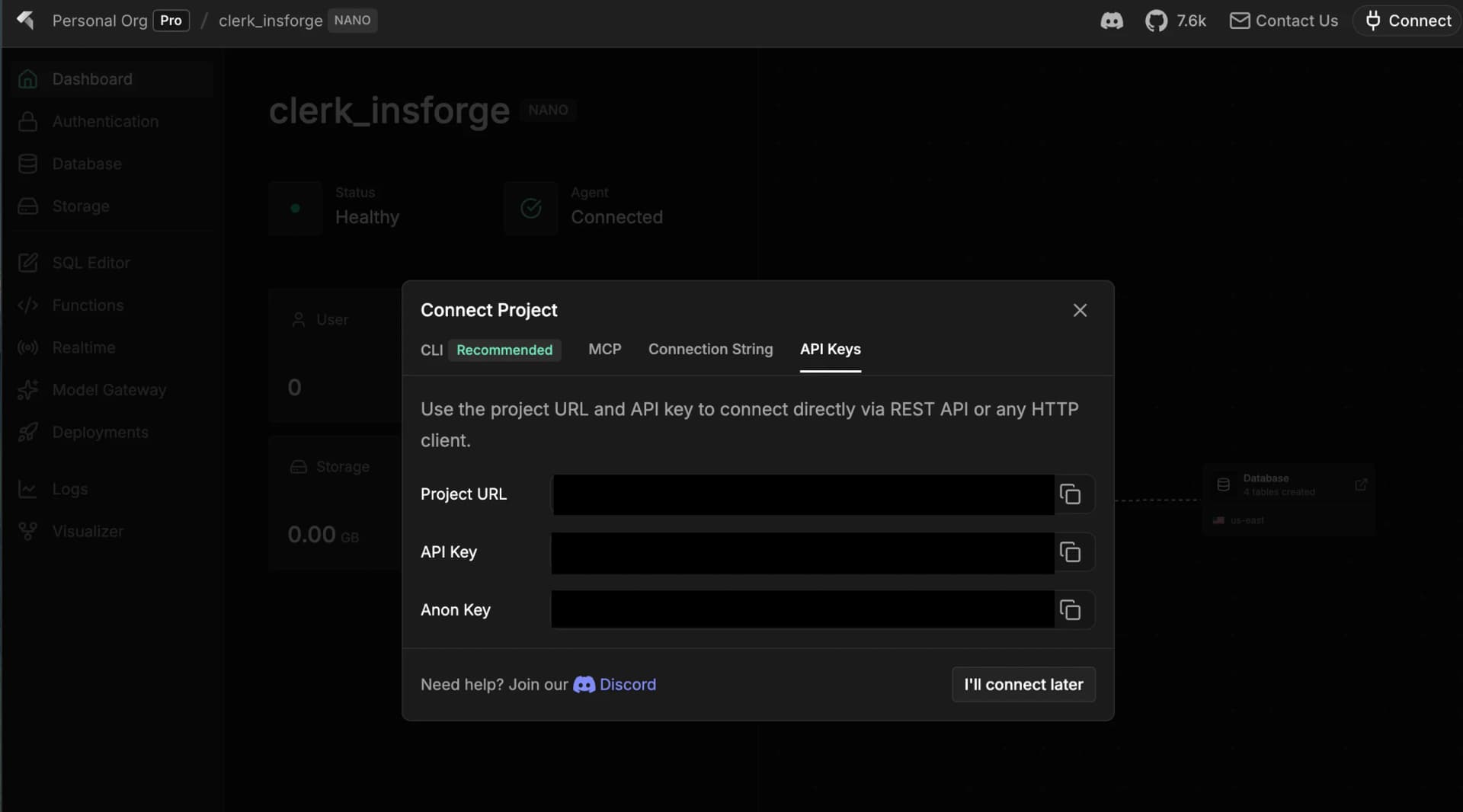
Copy the Project URL and Anon Key — you'll paste these into .env.local in Step 3.
The CLI prints the JWT Secret as JWT_SECRET=<value> — you'll use only the <value> part (everything after the =) when creating the Clerk JWT Template in the next step.
Step 2: Create a JWT Template in Clerk
- Go to your Clerk Dashboard
- Navigate to Configure > Sessions > JWT Templates
- Click New template and select Blank
- Name it
insforge - Toggle on Custom signing key
- Set the Signing algorithm to
HS256 - Paste your InsForge JWT Secret into the Signing key field
- Paste only the value, not the
JWT_SECRET=prefix. For example, if the CLI output isJWT_SECRET=a1b2c3d4e5f6..., paste onlya1b2c3d4e5f6....
- Paste only the value, not the
- Scroll down to Customize session token and set the claims to:
{
  "role": "authenticated",
  "aud": "insforge-api"
}
subandissare reserved claims in Clerk and are automatically included — do not add them manually.
- Click Save to create the template
Step 3: Set Up Your Application
Find your Clerk Publishable key and Secret key in the Clerk Dashboard under Configure > API keys (direct link) — the page also has a one-click Quick copy block preformatted for Next.js:
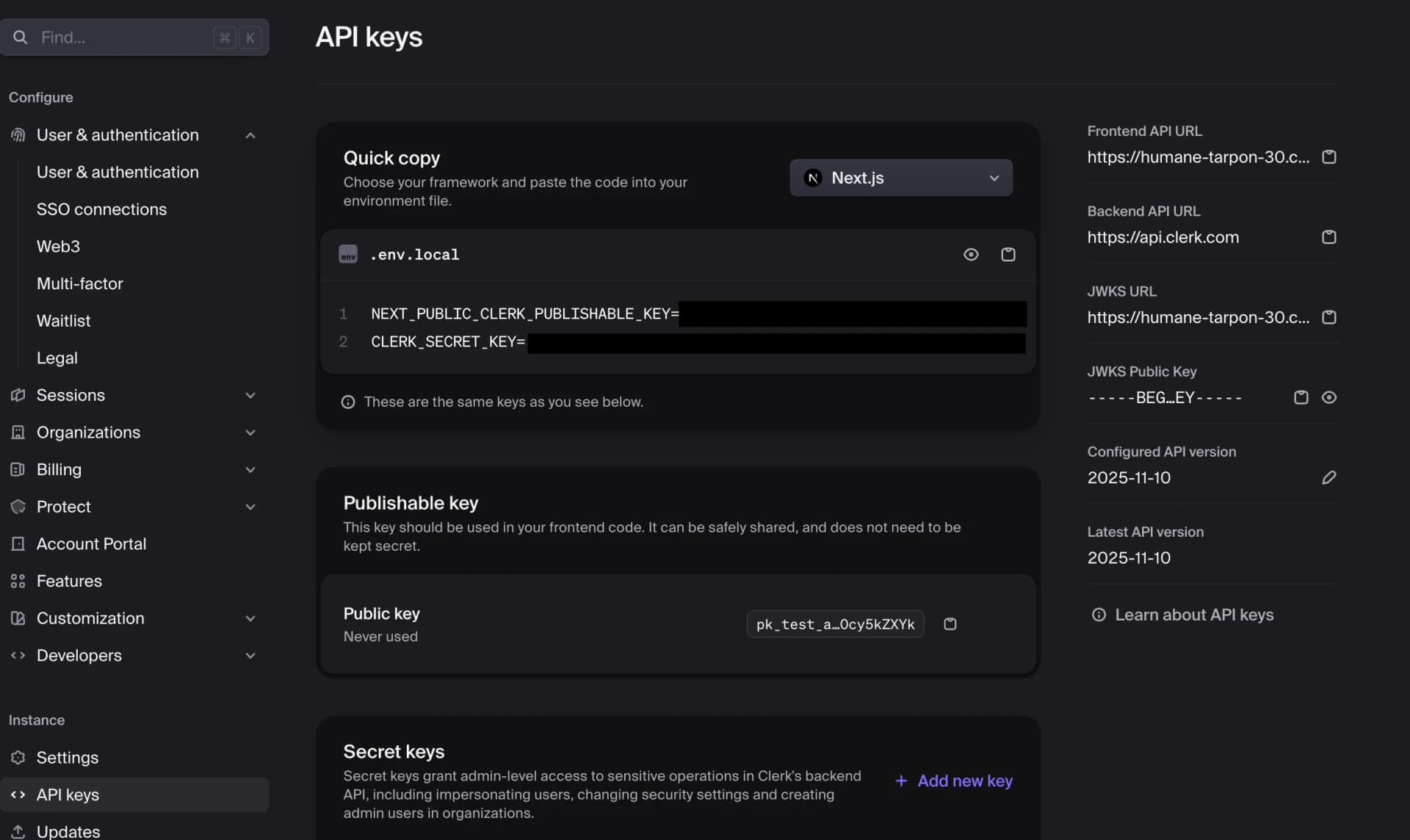
Don't confuse this with Configure > User & authentication > Features > User API keys — that's a separate feature for letting your app's end users generate their own API keys, not the keys your app uses.
Fill in .env.local:
NEXT_PUBLIC_INSFORGE_BASE_URL=...
NEXT_PUBLIC_INSFORGE_ANON_KEY=...               # optional
NEXT_PUBLIC_CLERK_PUBLISHABLE_KEY=pk_...        # required
CLERK_SECRET_KEY=sk_...                          # required by clerkMiddleware
Step 4: Set Up InsForge Integration
Ask your agent to complete the following steps:
1. Set up the InsForge client with Clerk
Set up the InsForge client with Clerk authentication. I'm using Next.js (App Router).
This initializes the InsForge client, then refreshes the Clerk token (getToken({ template: 'insforge' })) on a ~50-second interval via setAuthToken() so the token doesn't expire during the session.
2. Create the database schema
Create a todos table with RLS. Columns: id, user_id, title, is_complete, created_at. Users should only be able to access their own todos.
This creates the requesting_user_id() helper function (since Clerk user IDs are strings, not UUIDs) and a todos table with Row Level Security policies.
Do I need RLS on every table? No — only on tables that store user-specific data. Apply RLS based on your data model:
- User-private tables (todos, notes, drafts): enable RLS and filter by
user_id = requesting_user_id()so each user only sees their own rows.- Public read-only tables (blog posts, product catalog, leaderboards): keep RLS enabled but add a permissive
FOR SELECT USING (true)policy forauthenticated(andanonif unauthenticated reads are allowed). This is safer than disabling RLS outright.- Mixed tables (e.g., posts everyone can read but only the author can edit): enable RLS with a public
SELECTpolicy plusUPDATE/DELETEpolicies scoped touser_id = requesting_user_id().
3. Build the todo list page
Build a todo list page with full CRUD — create, read, update, and delete todos.
This creates a page that uses the InsForge client to manage todos. RLS ensures users only see their own data.
Step 5: Run Your Application
# Install dependencies if you haven't already
npm install

npm run dev
Open http://localhost:3000 and sign up with a new user through Clerk. Sign in, add a todo, then open both dashboards side-by-side — the new account shows up in the Clerk Dashboard under Users, the todo row appears in your InsForge database, and the InsForge Auth > Users page stays empty because Clerk owns the identity.
Why is InsForge's Auth > Users empty? Authentication is handled entirely by Clerk, so user records live in the Clerk Dashboard — not in InsForge. InsForge only sees the JWT claim (
sub) that RLS uses to scope data to the correct user.