

Self-hosted InsForge now supports Docker Compute.
Run long-lived containers on the same Docker host as InsForge. Workers, inference loops, websocket servers, scrapers, and other continuous processes can now stay inside your own infrastructure, without a Fly.io account or a separate compute bill.
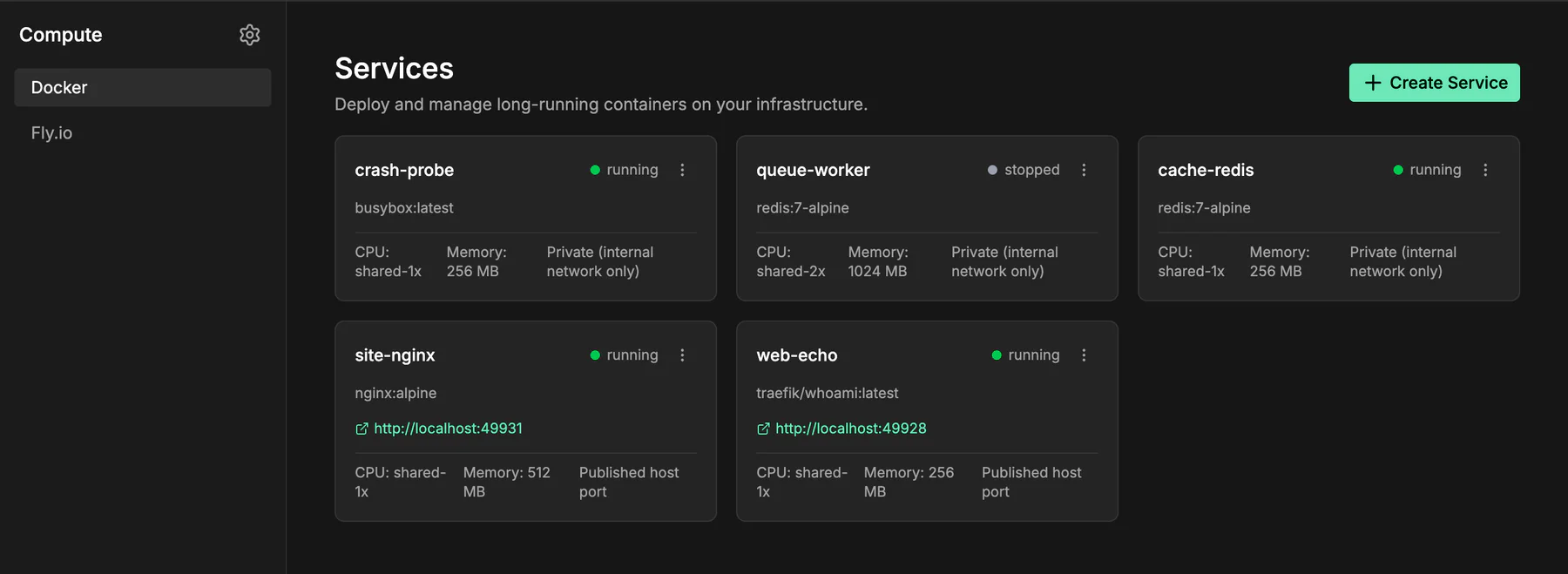
Run Compute on Your Own Host
Docker Compute is opt-in. Uncomment the socket mount already included in the InsForge Compose file:
services:
  insforge:
    volumes:
      - ${DOCKER_SOCKET_PATH:-/var/run/docker.sock}:${DOCKER_SOCKET_PATH:-/var/run/docker.sock}
Then restart InsForge:
docker compose up -d insforge
The backend detects the socket, joins its host-specific group, and registers the Docker provider. No DOCKER_GID lookup is required. The InsForge process still runs as the unprivileged application user after startup.
The Docker socket is root-equivalent on the host, so the mount remains an explicit operator decision. InsForge constructs each container specification from a fixed set of service fields. Compute requests cannot ask for privileged mode, arbitrary host mounts, or caller-defined Docker options.
Deploy Images or Build from Source
Create a service from the Compute dashboard with any public container image. InsForge pulls missing images, starts the container, applies CPU and memory limits, and records the service under the project that created it.
The Docker provider also accepts a tarred build context and builds its Dockerfile on the host. Build uploads are capped at 64 MB by default and run one at a time, protecting smaller VPS deployments from concurrent build spikes. The API returns the Docker build output when a step fails.
Private registry authentication is not wired into the first release. Use a public image or upload a source context.
Stay on the Project Network
Compute containers join the same Compose network as the rest of the project by default. From inside a service, postgres:5432 and postgrest:3000 resolve directly. Traffic does not need to leave the host and return through the public InsForge URL.
InsForge does not inject credentials automatically. Add only the database URL, API key, S3 credentials, or other environment variables that the workload needs. Set COMPUTE_ISOLATE_NETWORK=true if a service should remain off the project network.
Choose the Ingress
Each Docker service supports three ingress modes:
- None: the default. The container stays on the internal project network with no published host port.
- Port: Docker assigns a host port. Ports bind to
127.0.0.1by default, andCOMPUTE_PUBLIC_HOSTcontrols the advertised URL. - Host: InsForge advertises a hostname under
COMPUTE_DOMAIN. Route it with your own Caddy, Traefik, or nginx gateway.
InsForge does not silently publish a container to every interface. Change COMPUTE_BIND_ADDRESS only when the service should accept traffic beyond the host.
Manage the Full Lifecycle
Start, stop, update, delete, and inspect services from the dashboard or API. Logs preserve stdout and stderr with cursors for live polling. Containers use unless-stopped, so running services return after a host reboot.
CPU and memory changes apply in place. Changing the image, environment variables, port, or ingress recreates the container. There are no persistent volumes yet, so use InsForge Postgres or Storage for anything that must survive a redeploy.
Docker and Fly.io providers can coexist. Every service records the provider that created it, so enabling Docker does not strand existing Fly services. Set COMPUTE_PROVIDER=docker when Docker should be the default for new services.
Enable Docker Compute
Docker Compute ships with self-hosted InsForge v2.3.1. Mount the socket, restart the stack, then open Compute → Docker in the dashboard.