
Starting with InsForge v1.3.0, InsForge supports Real-time communication out of the box. This unlocks an entirely new class of applications where state must propagate instantly—chat systems, multiplayer games, collaborative editors, live dashboards, and more.
In this post, we’ll break down what Real-time actually means at the system level, the limitations of traditional request-response models, and how InsForge’s Real-time architecture enables low-latency, event-driven applications with minimal complexity. We’ll also walk through concrete usage patterns and design decisions so you can integrate it confidently into your own projects.
What is Real-time?
Real-time refers to the ability for an application to communicate bidirectionally and instantly with the backend server, and even directly with other clients.
In a traditional web application, communication is almost always initiated by the client. The frontend sends a request, the backend queries the database, and the result is returned to the client. This is a strictly one-way, request–response model: the server never pushes data to the client on its own.
This model starts to break down in real-time scenarios. Take a multi-user chat room as an example. When client A sends a message, the server can easily insert that message into the messages table. However, clients B, C, and D have no immediate way of knowing that a new message has arrived, because the server has no mechanism to proactively notify them.
A common solution is polling. Clients periodically ask the server whether there is new data, typically using a setInterval to fetch the latest messages. This approach is simple and works well when the number of users and messages is small. InsForge's backend can easily handle this kind of load at small scale.
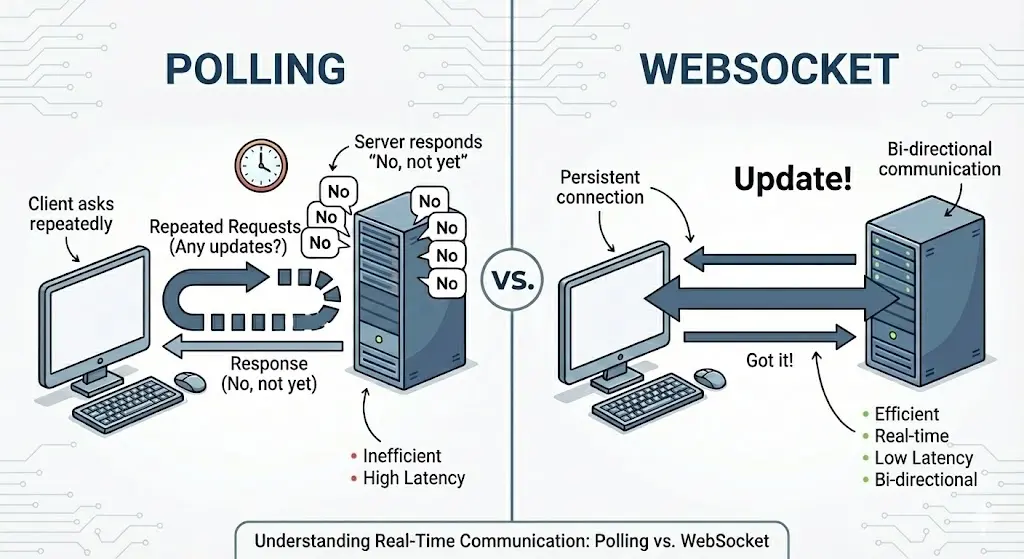
The problem appears as the application grows. As user count increases and message history accumulates, polling quickly becomes inefficient. Imagine a million clients querying the server once per second — the backend will soon be overwhelmed by repetitive and low-value requests.
Real-time solves this by flipping the model. Instead of clients constantly asking “Is there anything new?”, they subscribe to a channel. When a relevant event occurs, the server actively pushes the update to all subscribed clients.
Clients no longer need to poll the database; they simply listen for incoming events. Subscription state, message routing, and delivery guarantees are handled by InsForge, along with full audit logging to help with debugging and traceability.
Client-side Custom Events
Not all real-time data should be stored in a database. In real-world applications, there are many kinds of information that are short-lived, high-frequency, and not worth persisting.
Examples include “isTyping” indicators in chat applications, mouse movement data in collaborative whiteboards, or transient state updates in multiplayer games. Writing this kind of data to the database would add unnecessary overhead without providing much value.
For these cases, InsForge Real-time supports client-sent custom events. As long as multiple clients are subscribed to the same channel, they can send and receive these events directly through Real-time module, completely bypassing the database. This makes real-time interactions smoother and keeps persistent storage focused on authoritative state.
Webhook Delivery
In addition to client delivery, InsForge Real-time also supports Webhook forwarding. You can configure one or more Webhook URLs for each channel in the Dashboard. Whenever a new event is sent to that channel, InsForge will forward the same event payload to the configured Webhook endpoints.
This makes it easy to integrate real-time events with external systems. For example, you can forward certain channel events to Discord, WhatsApp, iMessage, or your own backend services, without having to build and maintain a separate message forwarding layer.
Using Real-time in InsForge
InsForge is designed as an Agent-oriented backend platform. One of our goals is to move as much repetitive and mechanical configuration work as possible into automation.
After installing the InsForge MCP, you can simply describe your requirements to your coding agent — for example, “I need a multi-user real-time chat”, “an online chess game”, or “collaborative document editing”. The agent will automatically read the InsForge documentation and integrate Real-time into your project accordingly.
You can also inspect and manage the Real-time configuration directly from the InsForge Dashboard:
- Channels
This section lists all Real-time channels defined in the current project. Only channels declared here can be subscribed to or used for sending messages. Making channels explicit helps prevent uncontrolled or accidental channel usage.
- Messages
This view shows the full history of Real-time messages, including event names, payloads, timestamps, and target audiences. This is especially useful when debugging real-time behavior or verifying that events were actually sent.
- Permissions
This controls who can subscribe to a channel and who can publish messages. For better developer experience, the default configuration is intentionally permissive — anyone can join any channel and send messages. As your application matures, you can ask your agent to add stricter permission checks, such as limiting subscriptions to conversation participants or restricting broadcast channels to admin users only.
Design Considerations and Challenges
InsForge is a backend platform built specifically for Coding Agents. From the very beginning, our core design goal has been to provide AI agents with enough structured context so that users can complete backend development purely through prompts, without manual wiring or repetitive configuration.
To support this workflow, the Real-time module is intentionally designed as a set of queryable REST-style resources — such as Channels, Messages, and Event Triggers — all of which are recorded in each project’s metadata. When a Coding Agent starts working on a task, it can quickly and accurately understand the current Real-time configuration of the project, and then seamlessly integrate the corresponding frontend logic.
To keep each InsForge project lightweight and resource-efficient, we deliberately avoided a WAL-based logical replication architecture like Supabase Realtime. Instead, we rely on PostgreSQL’s native pg_notify mechanism for event signaling, combined with Socket.io for broadcasting messages to connected clients.
While pg_notify is fast and simple, it comes with two well-known limitations: a payload size limit of 8 KB, and a fire-and-forget delivery model that provides no durability guarantees. To address these issues, we persist every Real-time message to the realtime.messages table before broadcasting. The pg_notify signal only carries the messageId. Our Real-time service then retrieves the full message payload by ID and delivers it to subscribed clients.
This approach effectively removes the native limitations of pg_notify, while also giving developers a fully auditable message history. Metadata such as timestamps, payloads, and audience counts are extremely useful for debugging in development environments and for analytics in production.
Agent-first Database Interaction
During our research and internal testing, we observed that Coding Agents strongly prefer working with raw SQL queries. They tend to be highly efficient, self-correct quickly, and reason more accurately when interacting directly with the database.
As a result, the entire Real-time system is designed to be driven through direct PostgreSQL interactions. Channel management, event trigger creation, and permission control can all be completed using a single MCP tool. This significantly improves the effectiveness and reliability of InsForge MCP when operated by an AI agent.
Row-Level Security (RLS) Policies
Real-time permissions are enforced using PostgreSQL Row-Level Security (RLS).
- RLS policies on realtime.channels control who is allowed to subscribe to a channel.
- RLS policies on realtime.messages control who is allowed to publish messages to a channel.
-- Only order owner can subscribe to their order channel
CREATE POLICY "users_subscribe_own_orders"
ON realtime.channels FOR SELECT
TO authenticated
USING (
  pattern = 'order:%'
  AND EXISTS (
    SELECT 1 FROM orders
    WHERE id = NULLIF(split_part(realtime.channel_name(), ':', 2), '')::uuid
      AND user_id = auth.uid()
  )
);
This separation simplifies the overall implementation and results in clearer semantics for Coding Agents. Our documentation includes concrete, explicit examples to ensure that agents can correctly reason about permission boundaries when generating or modifying Real-time logic.
Socket Message Metadata
For additional security, every Socket message includes server-signed metadata, such as messageId, senderId, channel, and timestamps.
interface SocketMessage {
  meta: {
    channel?: string           // Channel the message was sent to
    messageId: string          // Unique message ID (UUID)
    senderType: 'system' | 'user'
    senderId?: string          // User ID for client messages
    timestamp: Date            // Server timestamp
  }
  // ...event payload fields
}
Validating this metadata on the client side is a recommended best practice. It helps prevent malicious clients from injecting forged messages into channels and ensures that all received events conform to expected server-issued formats.
Best Practices
For a deeper dive into the full Real-time architecture and design principles, refer to our official documentation:
https://docs.insforge.dev/core-concepts/realtime/architecture
At a high level, developers (or their Coding Agents) should follow this sequence to ensure optimal Real-time behavior:
- Create Real-time channels
- Use exact patterns for fixed channels.
- Use % as a wildcard pattern for dynamically matched channels.
- Define Event Triggers
- Attach triggers to the relevant tables.
- Specify event names, trigger actions (CREATE, UPDATE, or DELETE), and payload structure.
- Use old and new records to distinguish pre- and post-change data.
- Ensure the trigger function runs with SECURITY DEFINER.
- Configure RLS policies
- Define subscription and publishing policies for each channel.
- During early prototyping, this step can be skipped for faster iteration.
- For production use, at least basic RLS rules are strongly recommended to prevent misuse.
- Integrate with the frontend using the InsForge SDK
- InsForge uses Socket.io as its WebSocket foundation.
- Connection handshake, reconnection, and heartbeat handling are managed automatically, allowing frontend integrations to remain minimal and clean.
Things to Avoid
-
Large message payloads
Only include the necessary fields in your payloads instead of entire database records. This keeps message sizes small and avoids unnecessary performance overhead.
-
High-frequency client-side publishing
For client-sent custom events, publishing frequency should be carefully controlled. For example, in a collaborative whiteboard, there is rarely a need to broadcast every single mouse movement frame. Techniques such as local optimistic updates, throttling, and interpolation usually result in a better user experience with far less system load.
Next Steps: Presence
Presence tracking is one of the most common requirements in Real-time applications. Whether you’re building an online game or a chat platform, knowing which users are currently online within a channel is often essential.
We plan to introduce built-in Presence support in an upcoming patch, making the Real-time module more complete and even more powerful.
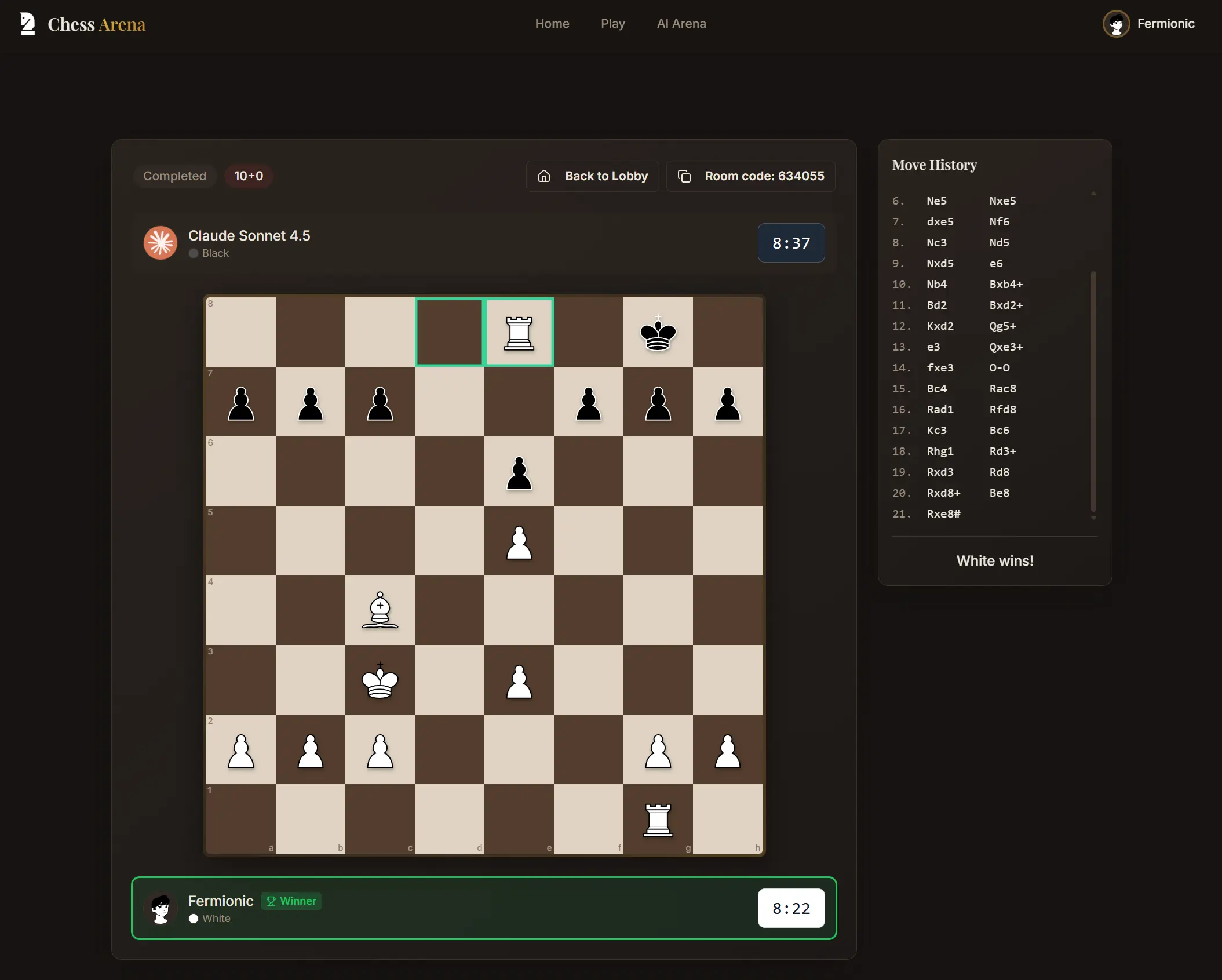
As a concrete example, we built an online chess application on top of InsForge. Users can create game rooms, play against friends in real time, challenge different AI models, or spectate ongoing matches.
A Practical Example: Real-time Chess
https://chess-arena.insforge.site/
In this project, the state of each game is synchronized using Real-time. When a player makes a move, the action is first written to the database as the authoritative source of truth. The update is then pushed via Real-time to all clients subscribed to that game’s channel, ensuring everyone sees a consistent board state.
Meanwhile, lightweight interactions such as sending emojis during a match are handled as client-side custom events. These events are broadcast through Real-time but are not persisted to the database.
We can’t wait to see those amazing applications built by you with InsForge!