

InsForge now supports Stripe-powered payments.
For most teams, Stripe is still where you start. It gives you a checkout flow people already trust, solid subscription primitives, and a billing portal you probably do not want to rebuild yourself. What tends to slow a team down is not the decision to use Stripe, but everything that comes after: configuring test and live keys, creating products and prices, wiring webhook endpoints, keeping customer ownership straight, and making sure fulfillment comes from events rather than redirect pages.
Payments is currently in private preview. With InsForge, Stripe remains the source of truth, while the surrounding setup becomes something your agent can help carry. Instead of stitching the whole flow together by hand, you can describe the billing experience you want, let the agent wire the technical pieces, and use the dashboard to understand what is happening as you build.
Why Stripe Still Makes Sense, and Where the Work Shows Up
Stripe gives developers the primitives most teams actually need:
- Checkout: hosted payment collection that most teams trust in production
- Subscriptions: recurring billing, invoices, and lifecycle state
- Billing Portal: payment-method updates, invoice history, and self-serve cancellation
- Ecosystem: a mature API surface and good global coverage
Where the friction appears is in the layer around those primitives:
- Environment setup: separate
testandlivekeys, plus safe rollout discipline - Catalog management: products and prices need to exist before app code can reference them
- Webhook plumbing: public endpoints, signature verification, retry safety, and deduplication
- Billing ownership: your app still needs a clear subject for who owns a subscription
- Fulfillment correctness: success pages are not enough; the real source of payment truth is asynchronous events
We kept seeing the same pattern across integration work. Teams were rarely blocked by Stripe itself. They were blocked by the long trail of setup, bookkeeping, and correctness work that sits around a payment flow.
What We Put Into the Agentic Workflow
InsForge is not trying to replace Stripe. What we want to remove is the repetitive integration work around it, especially the parts that are technical, necessary, and easy to get subtly wrong.
A developer can start with a prompt that reads more like a request than a specification:
Add subscription billing to this app with InsForge Payments in Stripe test mode. Create a Pro monthly plan, add checkout on
/billing, and grant access from webhook-projected subscription state instead of success redirects.
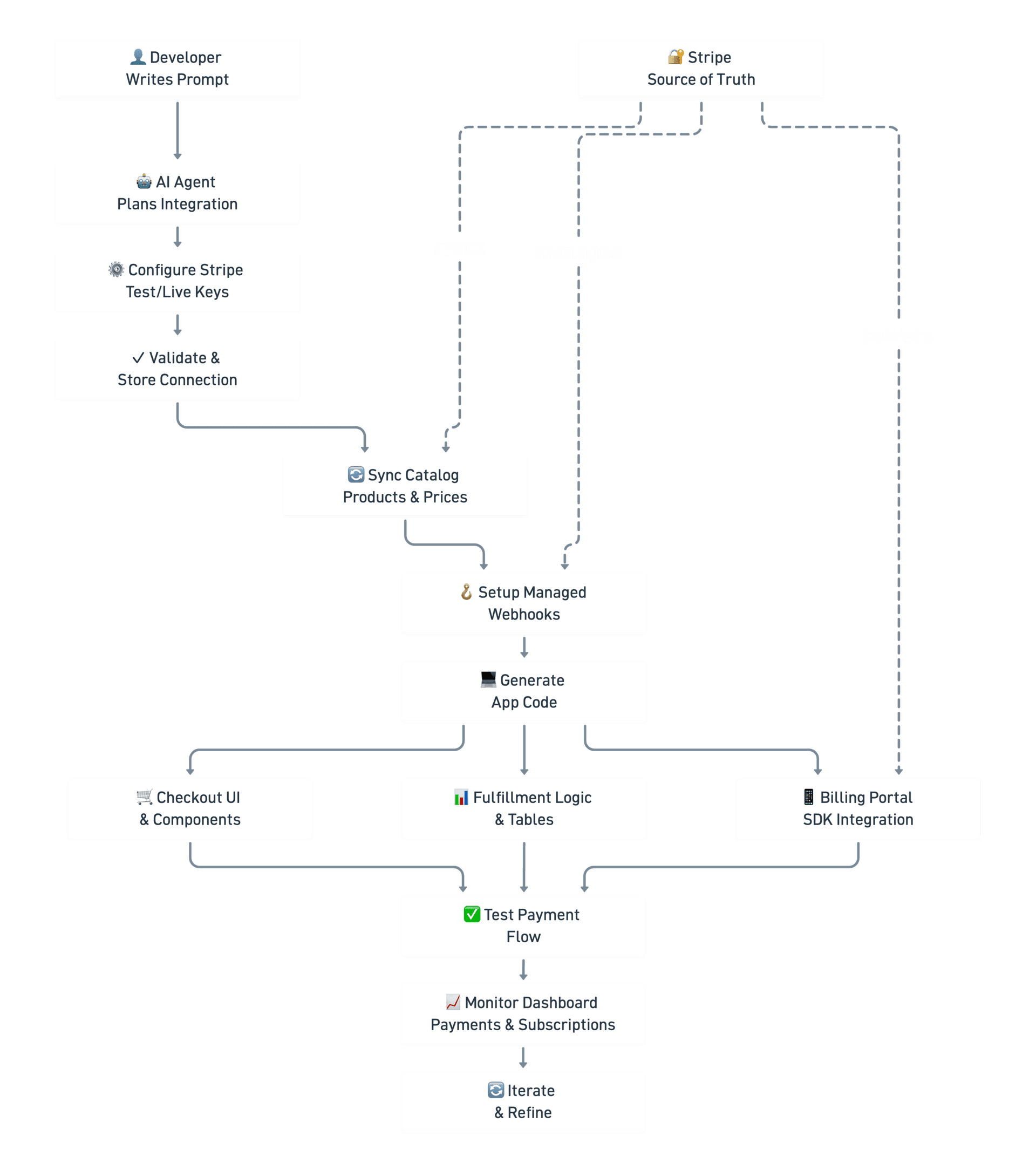
From there, the agent can work through the setup in the same way a careful engineer would, just with much less manual back-and-forth:
- Stripe configuration: set the
testorlivekey through Payments Settings or the InsForge CLI - Catalog sync: pull products, prices, customers, and subscriptions into InsForge so the agent can work against real IDs
- Managed webhooks: configure the Stripe webhook that keeps payment state current
- Runtime sessions: create Checkout and Billing Portal sessions from InsForge routes instead of exposing Stripe secret keys in frontend code
- App-specific fulfillment: write the app-owned tables and logic that actually grant access, mark orders paid, or apply credits
That is where InsForge helps most. Stripe still handles the money movement and the financial surface area it was built for, while InsForge gives agents a much shorter path from prompt to working billing flow.
What the Payment Journey Looks Like
Seen from the user's side, the journey is fairly simple, even if there is a lot happening underneath:
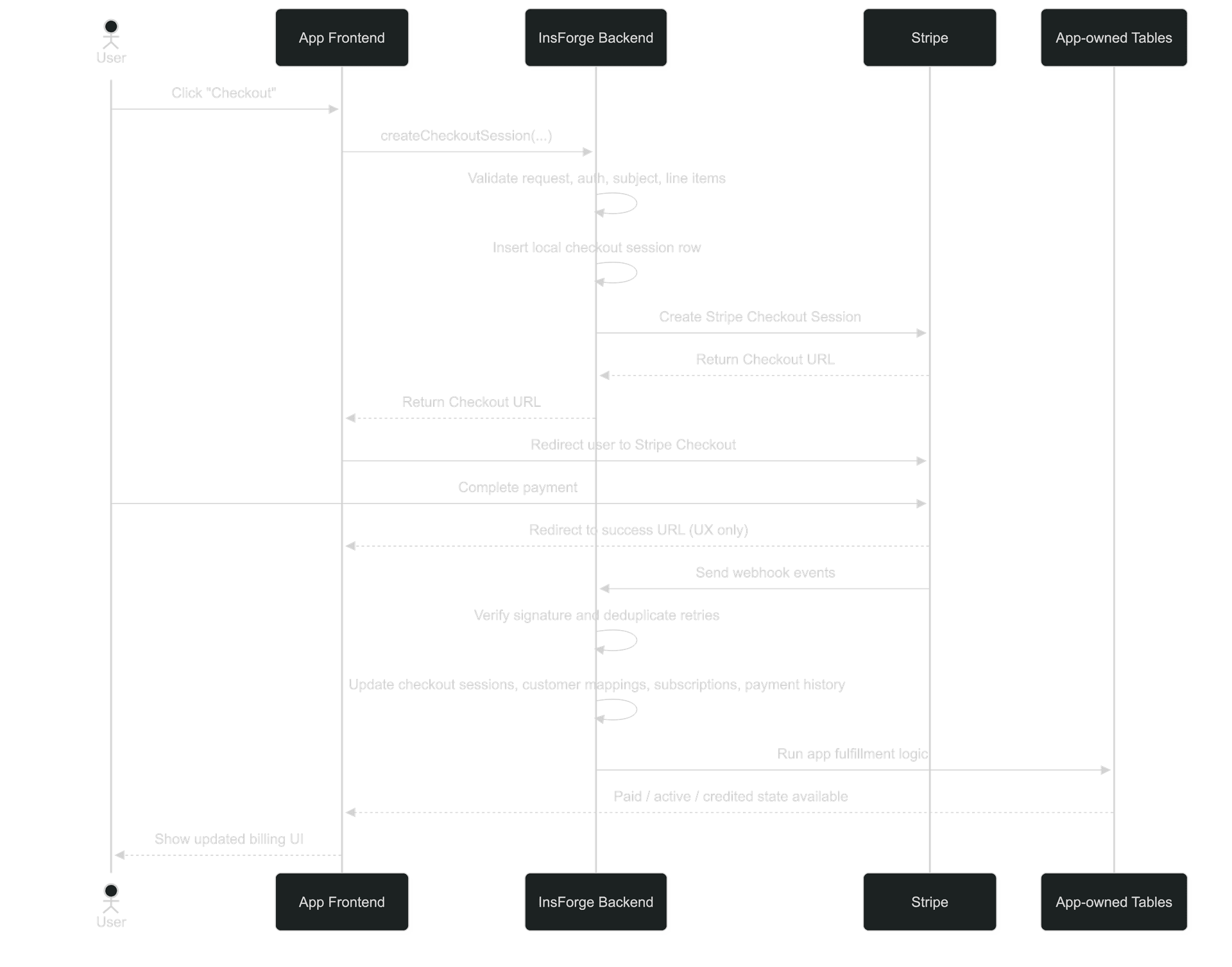
- A user clicks your checkout button in the app.
- Your frontend asks the InsForge backend to create a Checkout Session. InsForge validates the request, creates a local session row, calls Stripe, and returns the Stripe Checkout URL.
- Your frontend redirects the user to Stripe Checkout, where the actual payment happens.
- After the customer pays, Stripe records the result and sends webhook events back to InsForge.
- InsForge verifies the webhook signature, handles retries safely, and projects the result into the payment tables: checkout sessions, customer mappings, subscriptions, and payment history.
- Your app-owned business logic reacts to that projected state and updates the tables your app really uses, such as
orders,credit_ledger, orteam_billing_status. - Your frontend reads those app-owned tables and shows the UI change: paid order, active subscription, updated credits, or billing status.
The important handoff happens between the redirect and the webhook. The redirect helps the user land back in your app with the right context, but the webhook-projected state is what actually confirms the payment and lets your fulfillment logic act with confidence.
If that first successful checkout creates a new Stripe customer, InsForge also writes the subject-to-customer mapping that later lets the same user or team open Stripe Billing Portal from your app without extra reconciliation work.
What You Watch in InsForge, and What Still Belongs in Stripe
Once the integration is live, InsForge becomes the place you open when you want to understand whether the flow is behaving the way you expect. The dashboard gives you quick visibility into:
- Catalog: synced products and prices
- Customers: synced customer records for visibility
- Subscriptions: recurring billing state by environment
- Payment History: successful payments, failures, and refunds
That is the routine visibility layer. It helps you confirm that the payment flow is configured the way you intended, syncing the way you expect, and producing the state your app needs.
For the heavier financial controls, you still go to Stripe:
- Refunds
- Disputes
- Advanced financial operations
- Any workflow where Stripe should remain the final control surface
That split is intentional. InsForge is there to make the integration path and day-to-day visibility easier, while Stripe remains the system where the underlying financial operation is finalized and managed.