
At InsForge, we provision a dedicated EC2 instance per project to power your backend. From the outside, it feels simple: create a project, get a backend. But under the hood, provisioning an EC2 instance is not just about compute.
Understanding that distinction is what ultimately saved us thousands of dollars.
The Problem
As we scaled InsForge, our AWS bill grew—which was expected. What wasn't expected was a new category growing much faster than everything else: EC2-Other.
At first, we didn't spend much time on it. The absolute number was small, and nothing in production was breaking. But month over month, EC2-Other continued to rise exponentially—until it accounted for more than one-third of our total AWS cost.
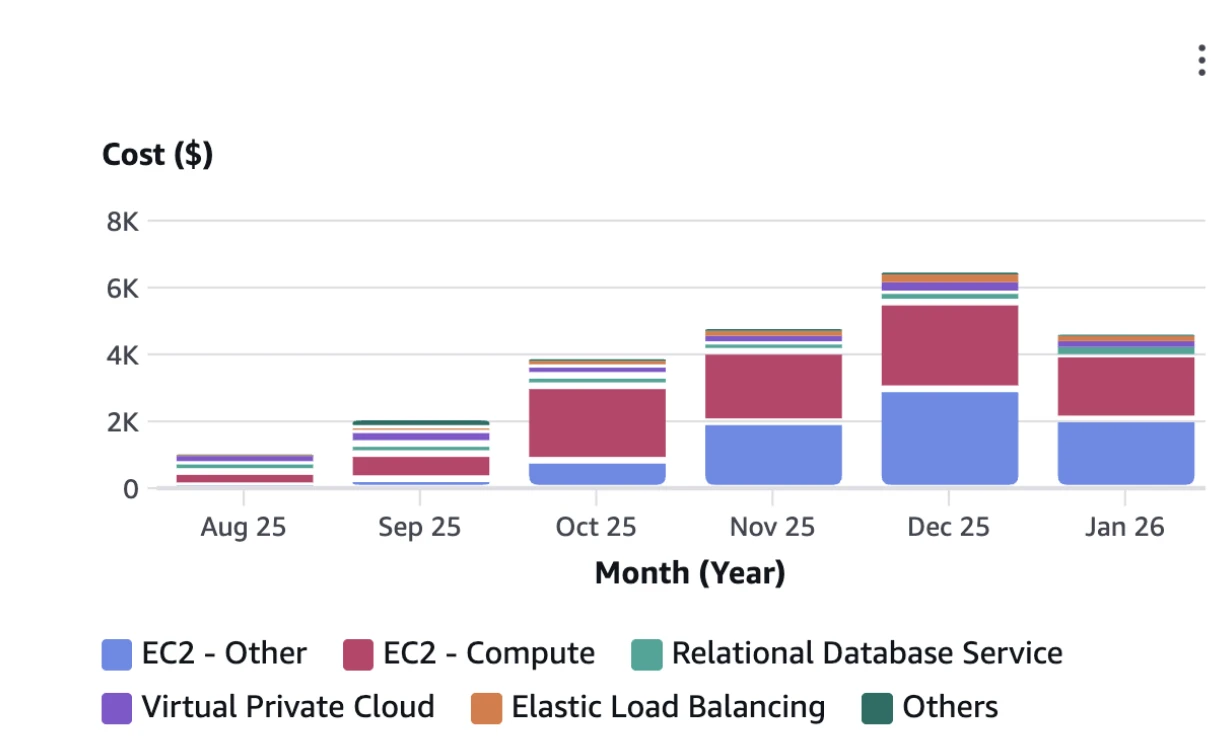
This was confusing, given that:
- Active EC2 instance count was steadily increasing linearly
- Traffic patterns hadn't changed
- No long-running jobs were added
Cost was accelerating, but usage wasn't. That mismatch was the signal that something fundamental was off.
The Investigation
We first correlated EC2 instance count with cost and confirmed it wasn't caused by instance bursts or leaked compute.
So we asked the obvious question: What even is EC2-Other?
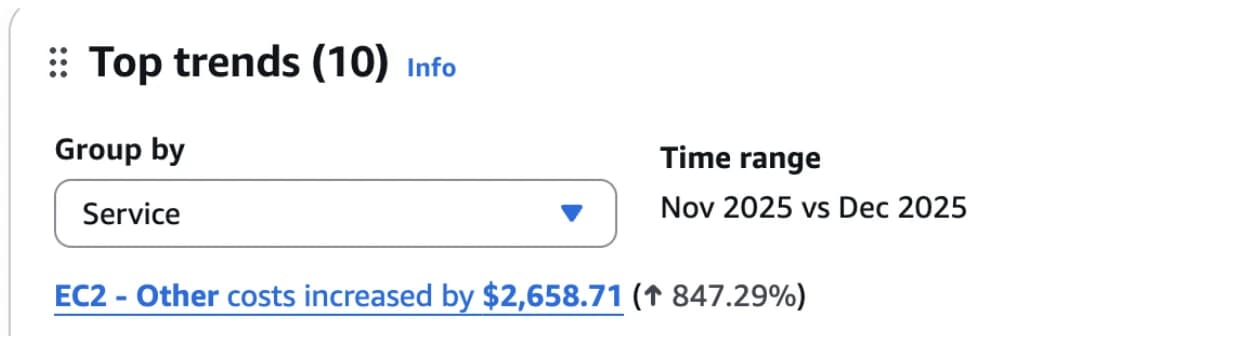
EC2-Other isn't a real AWS service. It's a catch-all billing category in Cost Explorer for EC2-related charges that aren't compute. Digging through Cost Explorer and AWS discussions, the picture became clear.
EC2-Other includes everything attached to EC2 that is not compute:
- EBS volumes
- EBS snapshots
- Provisioned IOPS / throughput
- Elastic IPs
- Inter-AZ data transfer
- AMI snapshot storage
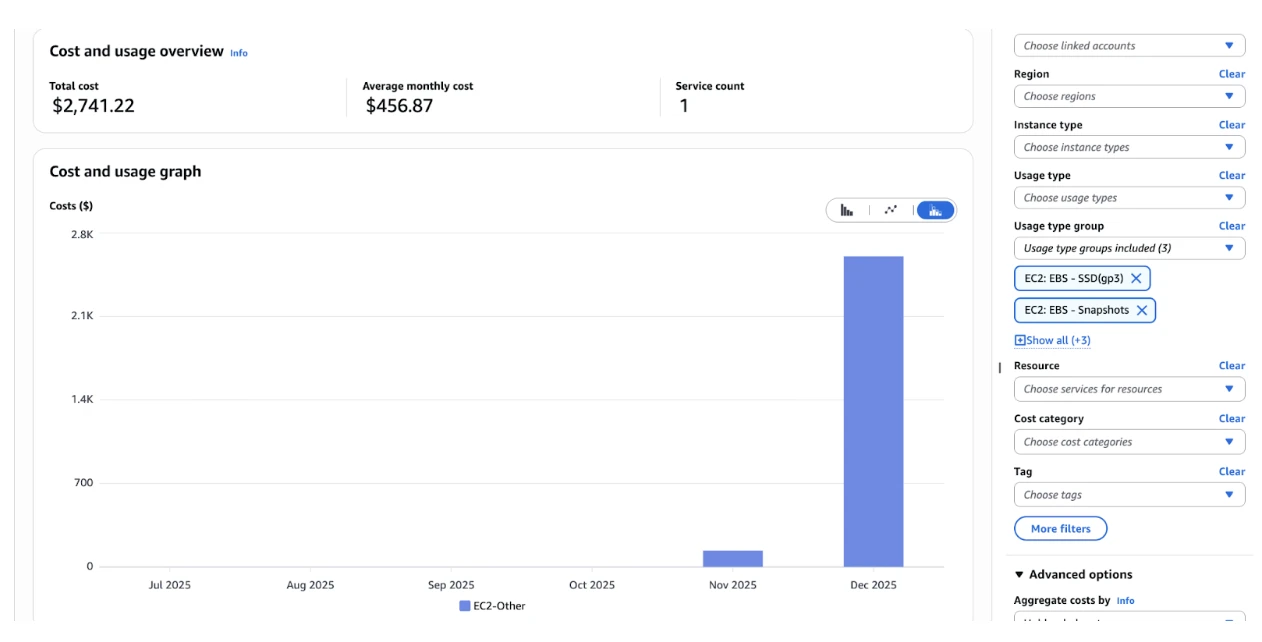
We then examined our usage-level costs in detail. That's when it clicked: the real issue wasn't EC2. It was EBS.
EBS (Elastic Block Store) is AWS's persistent disk storage for EC2 instances. It backs every instance's root disk and any attached data volumes.
We discovered thousands of orphaned EBS volumes. These unattached volumes were still incurring storage costs, silently burning money without providing any value.
EC2 Lifecycle
It turned out the root cause wasn't EBS itself, but how EBS behaves across the EC2 lifecycle.
When we provision an EC2 instance, AWS doesn't create a single resource.
aws ec2 run-instances \
  --image-id ami-0abcdef1234567890 \
  --instance-type t3.micro
Even with this minimal command, AWS creates a set of independent resources that happen to be attached to each other:
- Compute — the EC2 instance itself, providing CPU and memory
- Storage — one or more EBS volumes, including the root volume and any data volumes
- Networking — public or Elastic IPs, network interfaces, and security groups
What we call an "EC2 instance" is really the combination of compute, storage, and networking working together.
These resources are created implicitly, but they do not share the same lifecycle.
When we later call:
aws ec2 terminate-instances \
  --instance-ids i-0123456789abcdef0
Only the compute is guaranteed to be deleted. Storage (EBS) and networking resources persist unless their lifecycle is explicitly defined.
At first, this didn't create a noticeable cost. AWS provides a limited EBS Free Tier for new accounts, which covers a fixed amount of persistent storage. Early on, the EBS volumes and snapshots left behind by deleted instances stayed within that free allowance, so EC2-Other remained negligible.
As the infrastructure scaled, however, those leftovers quietly crossed the free tier boundary.
The Solution
We started by cleaning up the damage: deleting all the orphaned EBS volumes we could safely remove. That alone caused an immediate drop in our AWS bill.
But cleanup wasn't the real fix. The real fix was making sure this wouldn't happen again.
There's a single flag that controls whether an EBS volume is deleted when an EC2 instance is terminated:
DeleteOnTermination
If this flag isn't explicitly set, an instance can be terminated while its EBS volume lives on—fully billable and easy to miss.
The fix was to make this behavior explicit at provisioning time:
aws ec2 run-instances \
  --image-id ami-0abcdef1234567890 \
  --instance-type t3.micro \
  --block-device-mappings '[
    {
      "DeviceName": "/dev/xvda",
      "Ebs": {
        "VolumeSize": 30,
        "VolumeType": "gp3",
        "DeleteOnTermination": true
      }
    }
  ]'
Once we enforced DeleteOnTermination=true for all non-persistent volumes, the problem stopped entirely. Instances were terminated, storage was cleaned up automatically, and no new orphaned volumes were created.
Takeaway
Without changing traffic, instance count, or architecture, this single change reduced our AWS bill by 33%.
An EC2 instance isn't one resource. It's compute, storage, and networking loosely tied together. If you don't manage their lifecycles explicitly, AWS won't do it for you.
In our case, the difference between a growing cloud bill and a stable one really did come down to one missing flag.